> ## Documentation Index
> Fetch the complete documentation index at: https://www.integrate.io/docs/llms.txt
> Use this file to discover all available pages before exploring further.
# ETL: File Storage Source
> Configure the File Storage source to read files from Amazon S3, Google Cloud Storage, Azure Blob Storage, or SFTP servers in your ETL pipeline.
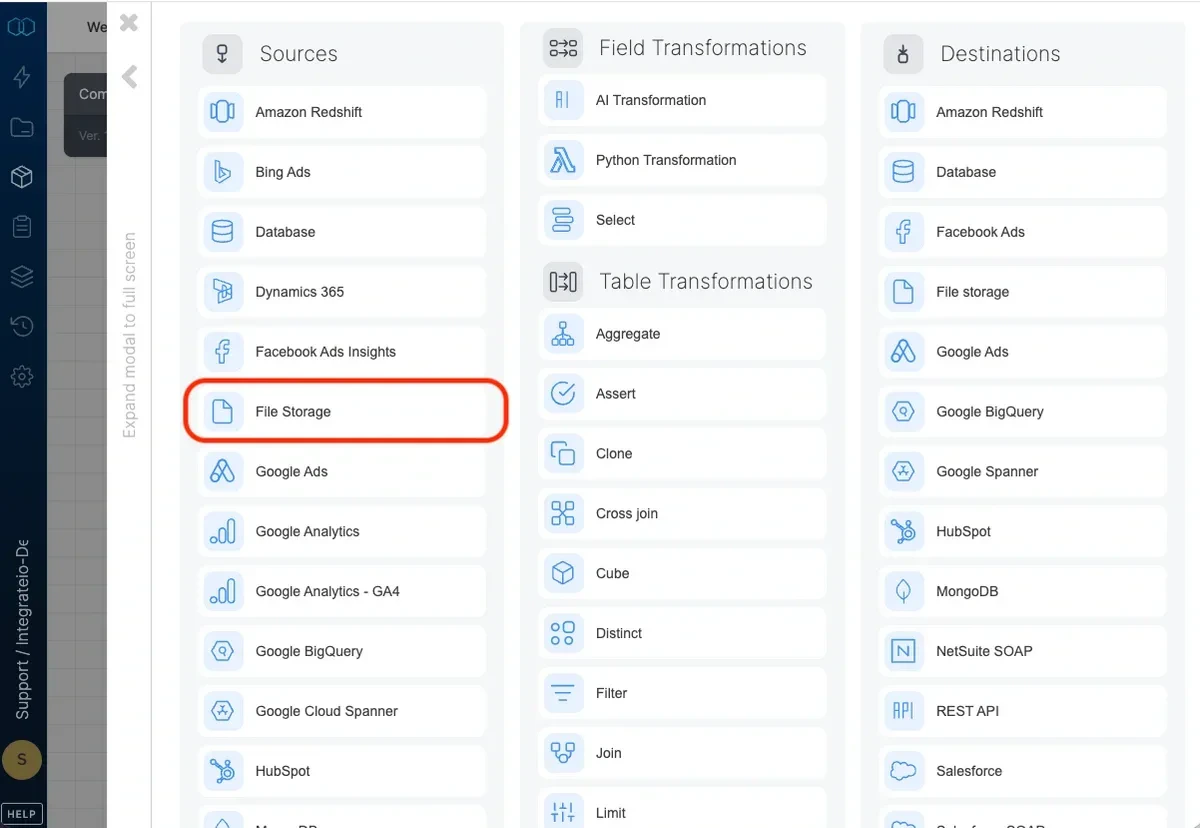 ## Connection
Select an existing file storage connection or create a new one. For more information, see [How to connect to your data sources.](/etl/category/connectivity-and-security)
## Source Properties
### Source location
## Connection
Select an existing file storage connection or create a new one. For more information, see [How to connect to your data sources.](/etl/category/connectivity-and-security)
## Source Properties
### Source location
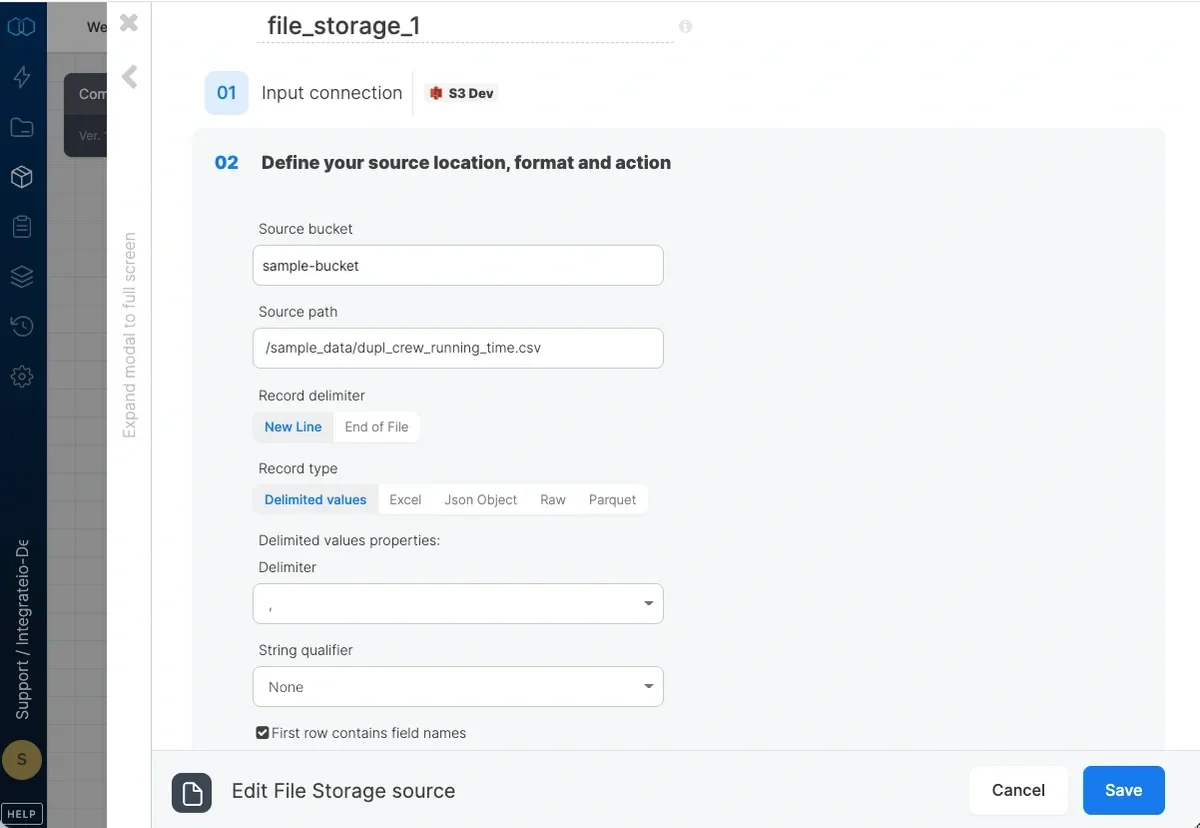 * **Source bucket** - The name of your cloud storage source bucket that contains the folders and objects defined in the path. Only relevant in the case of object stores such as Amazon S3 and Google Cloud Storage object stores.
* **Source path** - The path to your input folder or file. Examples:
* Folder: sales/2015/01/ (**Note**: This is NOT supported for **GCS**. Use pattern instead to specify multiple files.)
* File or object: sales/2015/01/log.csv
* Pattern: `sales/2015/{01,02}/`\
You can use wild card characters for [pattern globbing](/etl/using-pattern-matching-in-source-component-paths/ "Link: /etl/using-pattern-matching-in-source-component-paths/").
**Note**
File and directory names that begin with an underscore (\_) or a dot (.) are ignored and data contained in them will not be read.
### Source file format
* **record delimiter** - defines what breaks the data into records.
* New line (\n,\n\r,\r) - each line in your files is a record.
* End of file - each file is treated as a record.
* **record type** - defines the format of the record.
* Delimited values - fields are delimited by a delimiter you define such as tab, comma or otherwise (see delimited values parameters below).
* Excel - a MS Excel file (.xlsx)
* Json object - each record is a Json object (enclosed in curly brackets).
* Raw - the record is read in its entirety into a single string/binary field.
* Parquet - process .parquet file(s). **Note:** we are unable to ingest column with DATETIME/INT96 datatype.
**Notes on limitation for file format**:
We currently do not support Avro file format.
[Read more](/etl/how-do-i-select-my-file-input-format/) about selecting the right record delimiter and format.
**Note**:
The source data can be compressed (zip, gzip or bzip2) or uncompressed. If the zip file is password protected, enter the password in the zip password field; otherwise, leave it blank. The source data must be utf-8 encoded. If the data is encoded in another format, see [this](/etl/how-do-i-process-a-different-encoding/) doc for instructions on parsing.
### Delimited values parameters
If you selected new line record delimiter and delimited values record type, define the delimiter character used to separate fields in your objects and whether the data is enclosed in quotes.
In the **field delimiter** dropdown list, select one of the characters (, tab). You can also type a single character or one of the following escape sequences:
* \b (backspace)
* \f (formfeed)
* \n (newline)
* \r (carriage return)
* \t (tab)
* \\' (single quote)
* \\" (double quote)
* \\\ (backslash)
If some or all of the fields are enclosed in single or double quotes, select ' or " in the **string qualifier** dropdown list. If the fields may also contain line breaks, select **" (newline inside)** or **' (newline inside)** according to the string qualifier used in the files. Use the "newline inside" option with caution as unbalanced double quotes may have undesired effects on job performance.
You can select an **escape character** based on your input files if a **string qualifier** is chosen on the previous step. This is so that the escape characters are omitted and records are ingested accordingly.
Check **First row contains column names** if there is a header row in each source file and you wish to skip it.
Optionally enable **Detect header by name** to locate the header row dynamically by matching your schema column names. Use this when the header isn't always on row 1 (for example, files with a leading title or blank rows). The full schema header must still appear in column order in each file.
### Excel parameters
* **Sheet Name** - Specify one sheet name from your Excel file. Leave blank to combine all sheets (all sheets must share the same schema).
* **Ingest large Excel file** - Enable streaming mode for large Excel files. Provide a **Sheet Name** to read just one sheet, or leave it blank to combine all sheets.
* Check **First row contains column names** if there is a header row in the sheet and you wish to skip it.
* Enable **Match columns by name** to map workbook columns to your schema by header name instead of by position. Use this when column order varies between files.
* Enable **Detect header by name** to locate the header row dynamically by matching your schema column names. The header can be on any row, and combined with **Match columns by name** the columns can be in any order. Glob patterns (for example, `2025_*.xlsx`) are supported when matching by name.
When streaming with a sheet name (**Ingest large Excel file** enabled and **Sheet Name** set), date cells come through as Excel serial numbers (e.g. `45306`) instead of formatted dates. Declare those columns as `int` or `decimal` in your schema, or transform them downstream.
### Json parameters
* **Base record JSONPath Expression** - You can use a custom JSONPath expressions to define the base record and extract nested objects and arrays. Select the object preset, to use the keys of the JSON object as the input fields. Select the array preset, to use the keys of the JSON objects within the array as the input fields. Type in a custom JSONPath expression to extract fields of nested objects/arrays (e.g. `$.data[*]/` would use the keys of the JSON objects with the array named "data" in the input JSON).
### Source action
* **Source bucket** - The name of your cloud storage source bucket that contains the folders and objects defined in the path. Only relevant in the case of object stores such as Amazon S3 and Google Cloud Storage object stores.
* **Source path** - The path to your input folder or file. Examples:
* Folder: sales/2015/01/ (**Note**: This is NOT supported for **GCS**. Use pattern instead to specify multiple files.)
* File or object: sales/2015/01/log.csv
* Pattern: `sales/2015/{01,02}/`\
You can use wild card characters for [pattern globbing](/etl/using-pattern-matching-in-source-component-paths/ "Link: /etl/using-pattern-matching-in-source-component-paths/").
**Note**
File and directory names that begin with an underscore (\_) or a dot (.) are ignored and data contained in them will not be read.
### Source file format
* **record delimiter** - defines what breaks the data into records.
* New line (\n,\n\r,\r) - each line in your files is a record.
* End of file - each file is treated as a record.
* **record type** - defines the format of the record.
* Delimited values - fields are delimited by a delimiter you define such as tab, comma or otherwise (see delimited values parameters below).
* Excel - a MS Excel file (.xlsx)
* Json object - each record is a Json object (enclosed in curly brackets).
* Raw - the record is read in its entirety into a single string/binary field.
* Parquet - process .parquet file(s). **Note:** we are unable to ingest column with DATETIME/INT96 datatype.
**Notes on limitation for file format**:
We currently do not support Avro file format.
[Read more](/etl/how-do-i-select-my-file-input-format/) about selecting the right record delimiter and format.
**Note**:
The source data can be compressed (zip, gzip or bzip2) or uncompressed. If the zip file is password protected, enter the password in the zip password field; otherwise, leave it blank. The source data must be utf-8 encoded. If the data is encoded in another format, see [this](/etl/how-do-i-process-a-different-encoding/) doc for instructions on parsing.
### Delimited values parameters
If you selected new line record delimiter and delimited values record type, define the delimiter character used to separate fields in your objects and whether the data is enclosed in quotes.
In the **field delimiter** dropdown list, select one of the characters (, tab). You can also type a single character or one of the following escape sequences:
* \b (backspace)
* \f (formfeed)
* \n (newline)
* \r (carriage return)
* \t (tab)
* \\' (single quote)
* \\" (double quote)
* \\\ (backslash)
If some or all of the fields are enclosed in single or double quotes, select ' or " in the **string qualifier** dropdown list. If the fields may also contain line breaks, select **" (newline inside)** or **' (newline inside)** according to the string qualifier used in the files. Use the "newline inside" option with caution as unbalanced double quotes may have undesired effects on job performance.
You can select an **escape character** based on your input files if a **string qualifier** is chosen on the previous step. This is so that the escape characters are omitted and records are ingested accordingly.
Check **First row contains column names** if there is a header row in each source file and you wish to skip it.
Optionally enable **Detect header by name** to locate the header row dynamically by matching your schema column names. Use this when the header isn't always on row 1 (for example, files with a leading title or blank rows). The full schema header must still appear in column order in each file.
### Excel parameters
* **Sheet Name** - Specify one sheet name from your Excel file. Leave blank to combine all sheets (all sheets must share the same schema).
* **Ingest large Excel file** - Enable streaming mode for large Excel files. Provide a **Sheet Name** to read just one sheet, or leave it blank to combine all sheets.
* Check **First row contains column names** if there is a header row in the sheet and you wish to skip it.
* Enable **Match columns by name** to map workbook columns to your schema by header name instead of by position. Use this when column order varies between files.
* Enable **Detect header by name** to locate the header row dynamically by matching your schema column names. The header can be on any row, and combined with **Match columns by name** the columns can be in any order. Glob patterns (for example, `2025_*.xlsx`) are supported when matching by name.
When streaming with a sheet name (**Ingest large Excel file** enabled and **Sheet Name** set), date cells come through as Excel serial numbers (e.g. `45306`) instead of formatted dates. Declare those columns as `int` or `decimal` in your schema, or transform them downstream.
### Json parameters
* **Base record JSONPath Expression** - You can use a custom JSONPath expressions to define the base record and extract nested objects and arrays. Select the object preset, to use the keys of the JSON object as the input fields. Select the array preset, to use the keys of the JSON objects within the array as the input fields. Type in a custom JSONPath expression to extract fields of nested objects/arrays (e.g. `$.data[*]/` would use the keys of the JSON objects with the array named "data" in the input JSON).
### Source action
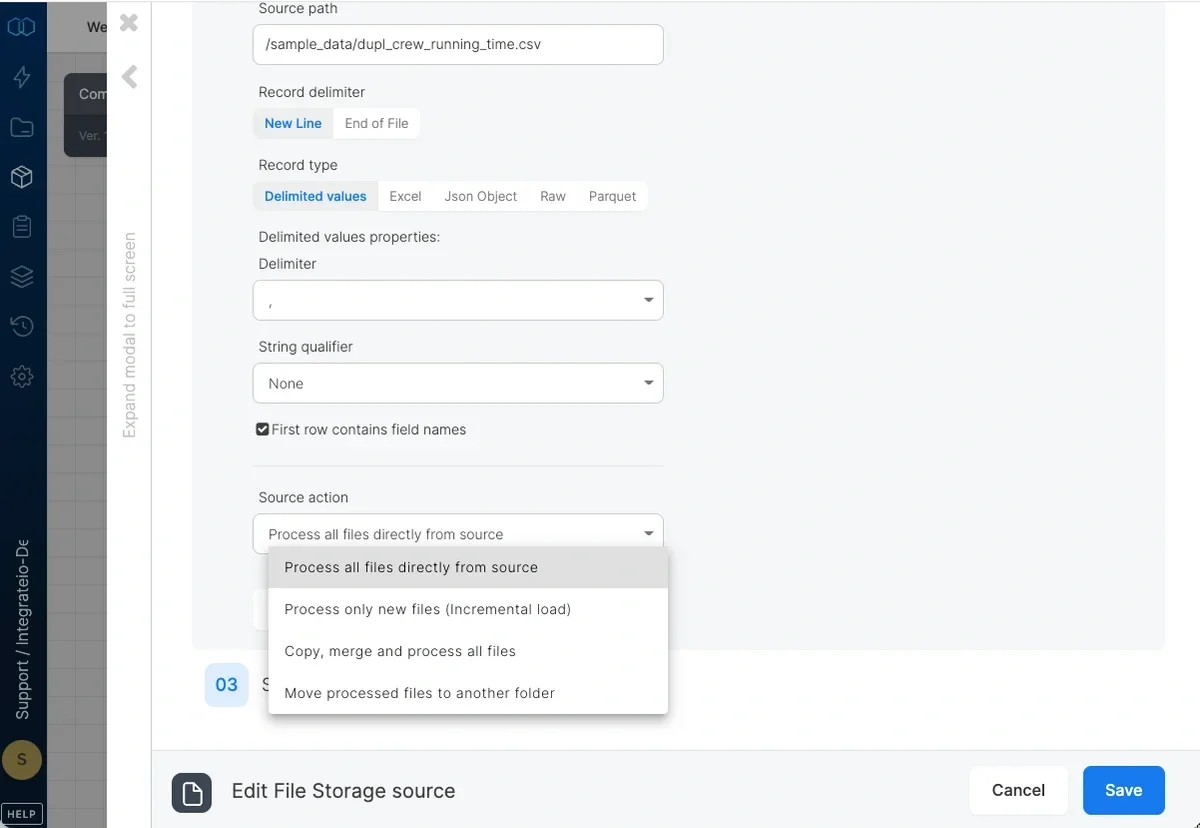 * **Process all files directly from source** - by default, files are read and data is manipulated within the same process.
* **Process only new files (Incremental load)** - Define connection and path to store file manifest (see below) to let Integrate.io ETL read only new files in your source bucket/path. This is not supported for Excel files.
* **Process all files directly from source** - by default, files are read and data is manipulated within the same process.
* **Process only new files (Incremental load)** - Define connection and path to store file manifest (see below) to let Integrate.io ETL read only new files in your source bucket/path. This is not supported for Excel files.
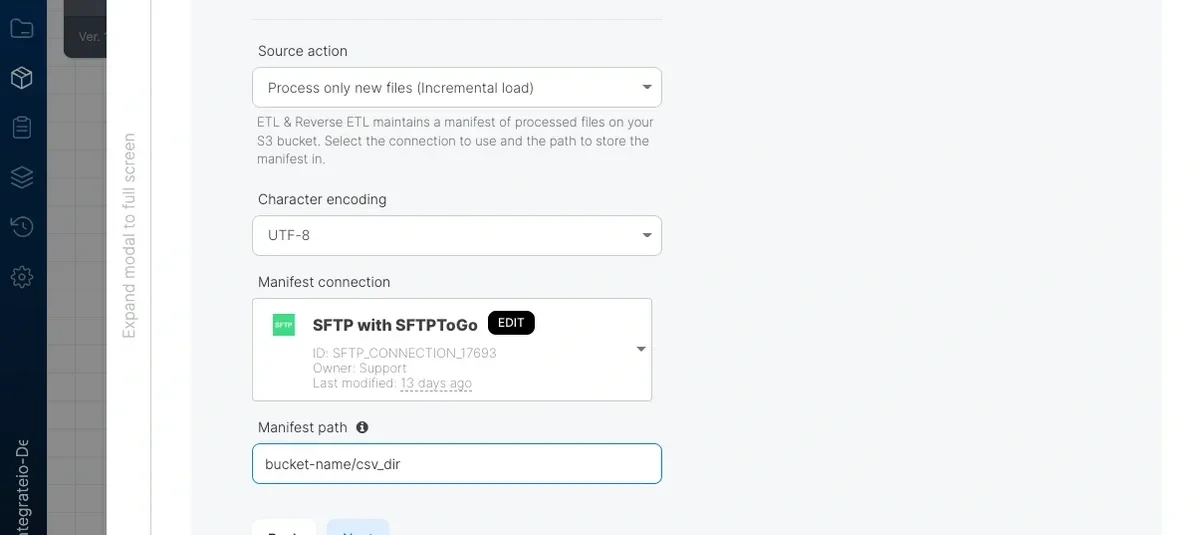 * **Manifest connection** - By default set to the source's connection. You may use another connection that has read/write access to store the manifest file.
* **Manifest path** - Fill in `bucket/directory/filename.gz`. This is where the manifest file will be stored when the job is executed. The manifest lists all files that have been processed. Each job execution compares the current file listing in the input path to the manifest and only processes new files. Backups of the previous manifests will be stored with each job execution for debugging/rollback purposes.
* **Copy, merge and process all files** - Use when the source path contains many small files and you'd like all of them. Integrate.io ETL will first read all files, merge them into larger files and then process them as large files which are faster to read and process.
* **Manifest connection** - By default set to the source's connection. You may use another connection that has read/write access to store the manifest file.
* **Manifest path** - Fill in `bucket/directory/filename.gz`. This is where the manifest file will be stored when the job is executed. The manifest lists all files that have been processed. Each job execution compares the current file listing in the input path to the manifest and only processes new files. Backups of the previous manifests will be stored with each job execution for debugging/rollback purposes.
* **Copy, merge and process all files** - Use when the source path contains many small files and you'd like all of them. Integrate.io ETL will first read all files, merge them into larger files and then process them as large files which are faster to read and process.
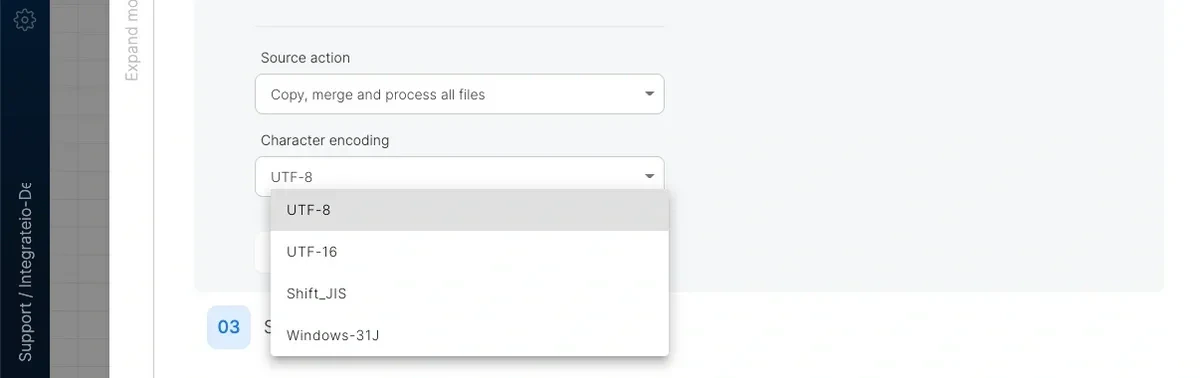 **Note:** The process will fail if the input path is for a single file. You may get strange results if your delimited data doesn't end in a line break or if your files contain header lines.
* Character Encoding - You can specify the **character encoding** of the input file. Only available when **source action** is set to **copy, merge and process all files**.
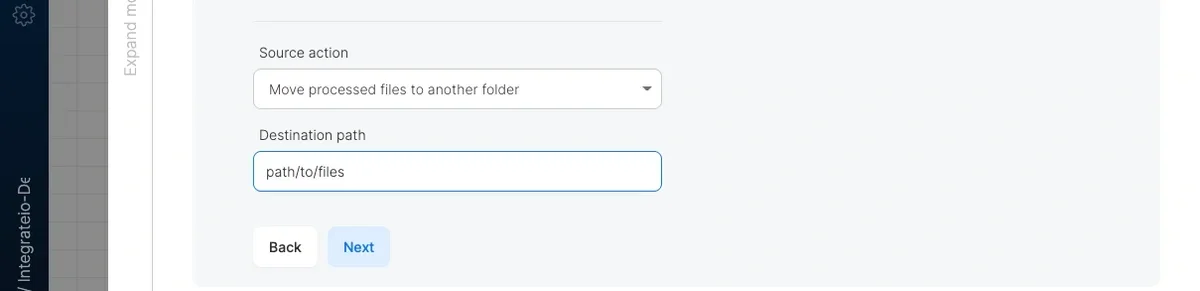
* **Move processed files to another folder** - Use when you want to move source files to backup directory after processing of contents.
**Note:** The process will fail if the input path is for a single file. You may get strange results if your delimited data doesn't end in a line break or if your files contain header lines.
* Character Encoding - You can specify the **character encoding** of the input file. Only available when **source action** is set to **copy, merge and process all files**.
* **Move processed files to another folder** - Use when you want to move source files to backup directory after processing of contents.
 ## Source Schema
After defining the source location and format, you select the fields to use in the source.
## Source Schema
After defining the source location and format, you select the fields to use in the source.
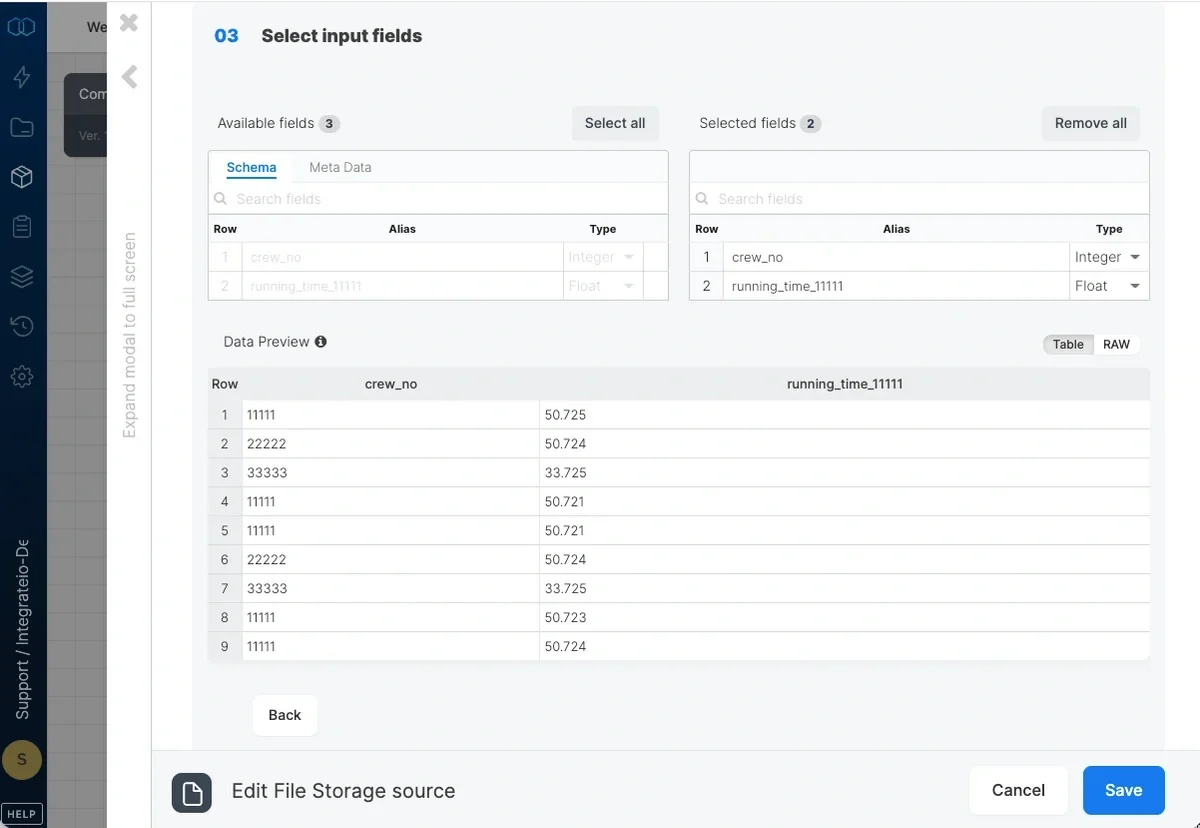 * With delimited values, fields are read by order so make sure you define all fields that exist in the source files by order.
* With JSON input, you may define only the fields that you wish to use in your package.
* With raw input, there is only a single field that contains the entire record data.
* Define how you will refer to these fields (alias) in the other components of your package. If you use illegal characters, we'll let you know before you close the dialog.
* You can also add `file_path` field (Under Meta Data) to get the path to the file as a field in your data.
For each field, define the alias to use for the field in following components and data type. For JSON input, define the key in the source JSON file for each field. Read more about processing JSON data [here](/etl/how-do-i-process-json-data/).
## Related
* With delimited values, fields are read by order so make sure you define all fields that exist in the source files by order.
* With JSON input, you may define only the fields that you wish to use in your package.
* With raw input, there is only a single field that contains the entire record data.
* Define how you will refer to these fields (alias) in the other components of your package. If you use illegal characters, we'll let you know before you close the dialog.
* You can also add `file_path` field (Under Meta Data) to get the path to the file as a field in your data.
For each field, define the alias to use for the field in following components and data type. For JSON input, define the key in the source JSON file for each field. Read more about processing JSON data [here](/etl/how-do-i-process-json-data/).
## Related